AI Agent
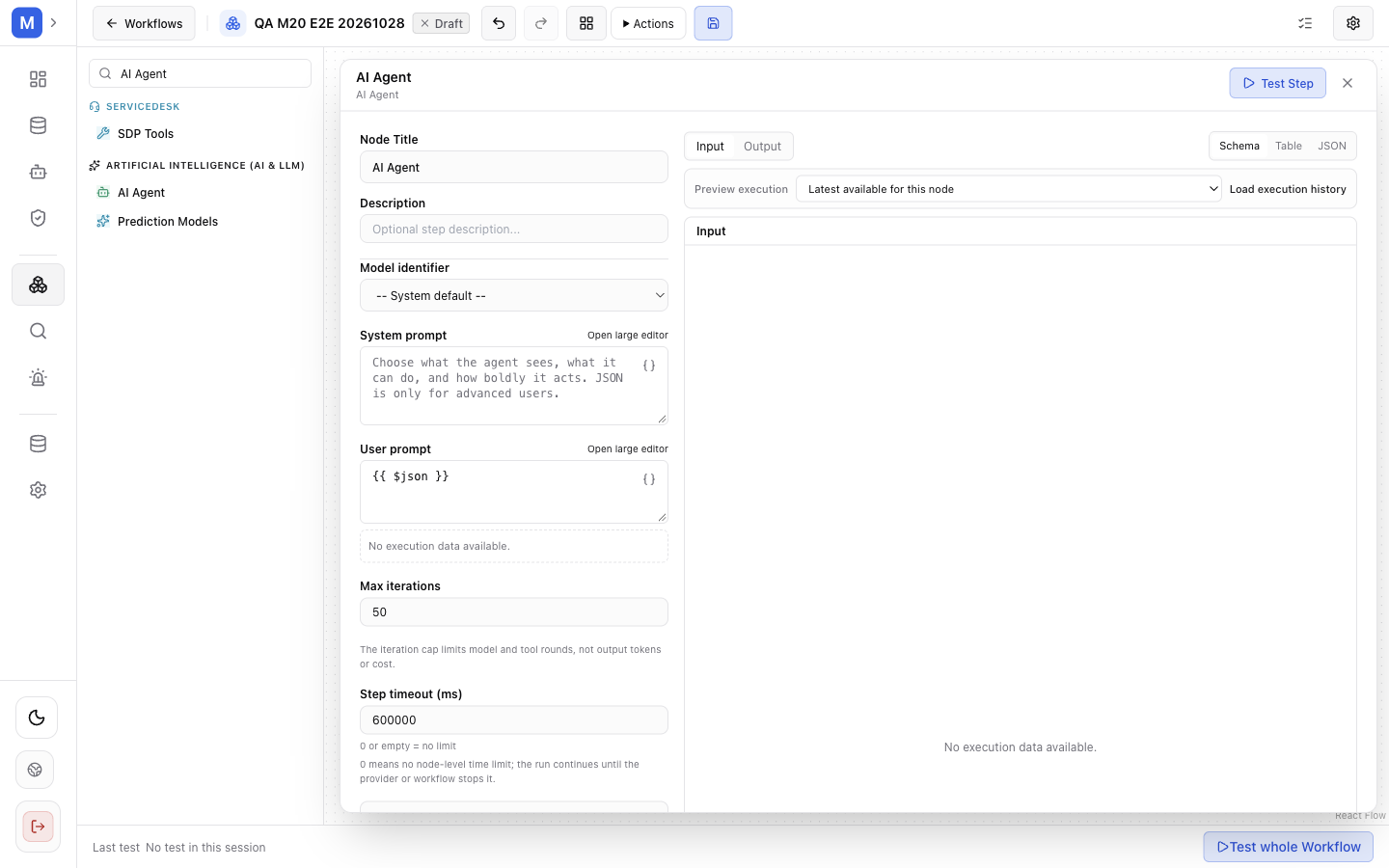
AI Agent runs a multi-turn agent with a tool loop.
Purpose and use: A multi-turn model/tool loop for tasks where a model may choose among explicitly connected capabilities. This Workflow node is not the same as a standalone registered Agent.
Configuration. Every field is optional; an empty field means “use the installation default”.
| Field | Type | Default | Effect |
|---|---|---|---|
agentKey | string | empty | Empty or default → the node owns its configuration. Any other value selects the registered-agent path and must name an active agent, or the node fails with INVALID_AGENT_KEY |
modelProfileId | string | empty | The profile this step runs on. Empty → the installation’s Agent route decides |
instructions | string, expressions allowed | You are a helpful AI Agent. | The system prompt. instructionsTemplate and systemInstruction are accepted as aliases for older graphs |
userPrompt | string, expressions allowed | {{ $json }} | The turn sent to the model. userPromptTemplate is the older alias |
maxIterations | number | 50 | Model/tool turns per run. The engine clamps to 1–9999; this is a cost and time bound, not a suggestion |
timeoutMs | number | unset = no limit | Bounds the step’s active work: the loop and the tool calls it starts. Clamped to 0–7 200 000. Waiting for an approval is not active time. The editor writes a default for new nodes; older graphs keep no limit |
autoExecuteTools | boolean | true | false means every tool call pauses for approval |
requireApproval | boolean | false | Pauses on the first tool that is not read-only |
toolExecutionPolicy | map | — | Per-tool auto / require_approval / blocked, which overrides the two switches above for that tool |
toolScopes | map | — | Per-tool access scope, narrowing what a bound tool may reach |
knowledgeScope | object | — | Narrows retrieval for this step only; intersected with the run scope and every bound provider’s scope |
Two details that surprise people:
- In node-owned mode the step always receives the read-only
skills_listandskill_viewtools, so an agent that may act on a procedure can read the procedures assigned to its workflow. That is discovery, not a capability grant. - Scope narrows, never widens. A node that asks for a wider scope than the run has gets the run’s scope, silently — so an empty answer is usually a scope intersection, not a model failure.
Input/output and routing: Inputs are input and tools_in; output is output. Connect ordinary data to input. Connect a provider’s tool_out to tools_in to expose capabilities. The model/tool loop returns its result on output; exact content depends on model interaction and configured tools.
Expressions: instructions and userPrompt accept workflow expressions. Connected provider selection is configuration, while bound tool arguments come from model tool calls. Scope fields constrain access.
Errors, permissions, and effects: Tool policies, autoExecuteTools=false, requireApproval=true, or operation-level approval can pause for human approval. Approval resumes from a materialized argument snapshot. The node is excluded from automatic retries. Tool calls can read or write; provider availability and operation grants are not ambient permissions. Review every exposed operation, scope, approval rule, and write before activation.
Example configuration — fields validated against the 1.1.1 node schema; replace the identifiers with your own: {"instructions":"Use only connected capabilities.","userPrompt":"{{ $json }}","autoExecuteTools":false}. Expected result: with automatic execution disabled, the node requests approval before any tool acts.