Procedures
A procedure is the instruction set that sits between an agent and a tool. Without one, an agent can answer questions; with one, it can be trusted to do a specific job with specific tools. This is the mechanism that turns a read-only assistant into something that may write.
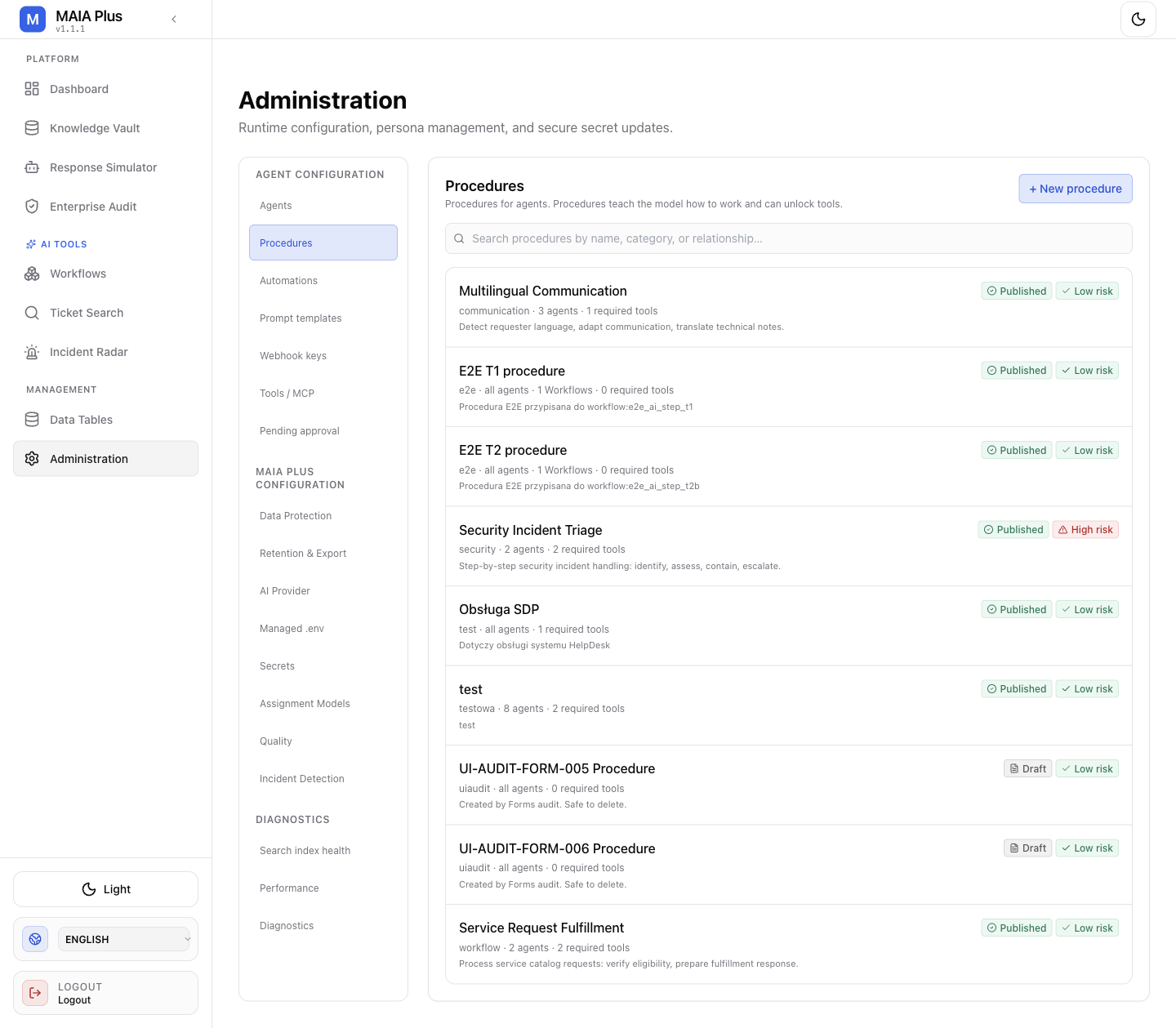
Each row shows publication state, risk label, category, the agents and tools it relates to, and its description.
What it is
Section titled “What it is”| Field | Meaning |
|---|---|
| Publication state | Draft or Published. A draft teaches nothing; only a published procedure is available to an agent. |
| Risk label | Low risk or High risk. The label is a human signal, not an enforced control. |
| Category | Groups procedures for search and filtering. |
| Related agents | Which agents can use the procedure. |
| Related tools | Which tools the procedure unlocks or constrains. |
| Description | What the procedure teaches, in the words the model will read. |
The important idea: a tool is granted twice. Once by ticking it on the agent’s Knowledge tab (so the model knows it exists) and once by a procedure that explains when and how to use it (so the model is allowed to). A write tool without a procedure is visible and unusable — which is exactly the safe default.
How it works
Section titled “How it works”- An agent is granted tools on its Knowledge tab.
- A procedure attached to that agent describes the task, the allowed operations and the conditions.
- On a run, the procedure text enters the prompt assembly for that agent.
- The Tool Gate still applies: risk, scope,
dryRunand approval policy decide whether the call executes.
A procedure cannot widen a scope. It can only describe intent within the scope the agent already has.
Create and publish
Section titled “Create and publish”- Open Administration → Procedures.
- Select + New procedure. Title and Description are required — Save stays disabled while either is blank.
- Pick the category and the risk label. High risk is for anything that writes, escalates or sends data outside MAIA Plus.
- Attach the procedure to the agents that should use it. Optionally relate it to a workflow.
- Save, then publish. Draft → Published is the step that makes it reachable at runtime.
- Verify on the agent: the procedure appears in its roll-up, and a test run in the Response Simulator shows the tool becoming available.
Disable, archive and delete are separate lifecycle actions. Archiving keeps the record for audit while removing it from runtime; deleting removes it.
Writing a procedure that works
Section titled “Writing a procedure that works”- State the goal, then the boundary. “Add an internal note summarising the diagnosis” works; “help with the ticket” does not.
- Name the tool explicitly. The model chooses from descriptions, so naming
ticket_add_notebeats describing “a note”. - Give the refusal condition. “If the ticket has no diagnosis yet, ask a clarifying question instead of writing.”
- Keep it short. Long procedures crowd out the actual conversation and get followed partially.
- Never put secrets or ticket data in it. Procedures are configuration, and they end up in prompts and logs.
Limits and failure modes
Section titled “Limits and failure modes”- Draft procedures → invisible at runtime; the tool stays locked.
- Procedure without the tool ticked → nothing changes; both halves are required.
- Risk label misused → a High-risk label on everything trains people to ignore it.
- Agent not attached → the procedure exists and never applies.
- Archived procedure → the tool locks again on the next run, not retroactively.
Related topics
Section titled “Related topics”Agents · Tools and MCP · Approvals and autonomy · Automations