Assignment models
Assignment Models are the non-generative half of MAIA Plus intelligence. A language model writes text; an assignment model scores candidates — which technician or which group should own this ticket — and either recommends or assigns them. This page covers the whole lifecycle: configuration, validation, training, shadow deployment, promotion, retraining, and the places where the prediction is actually used.
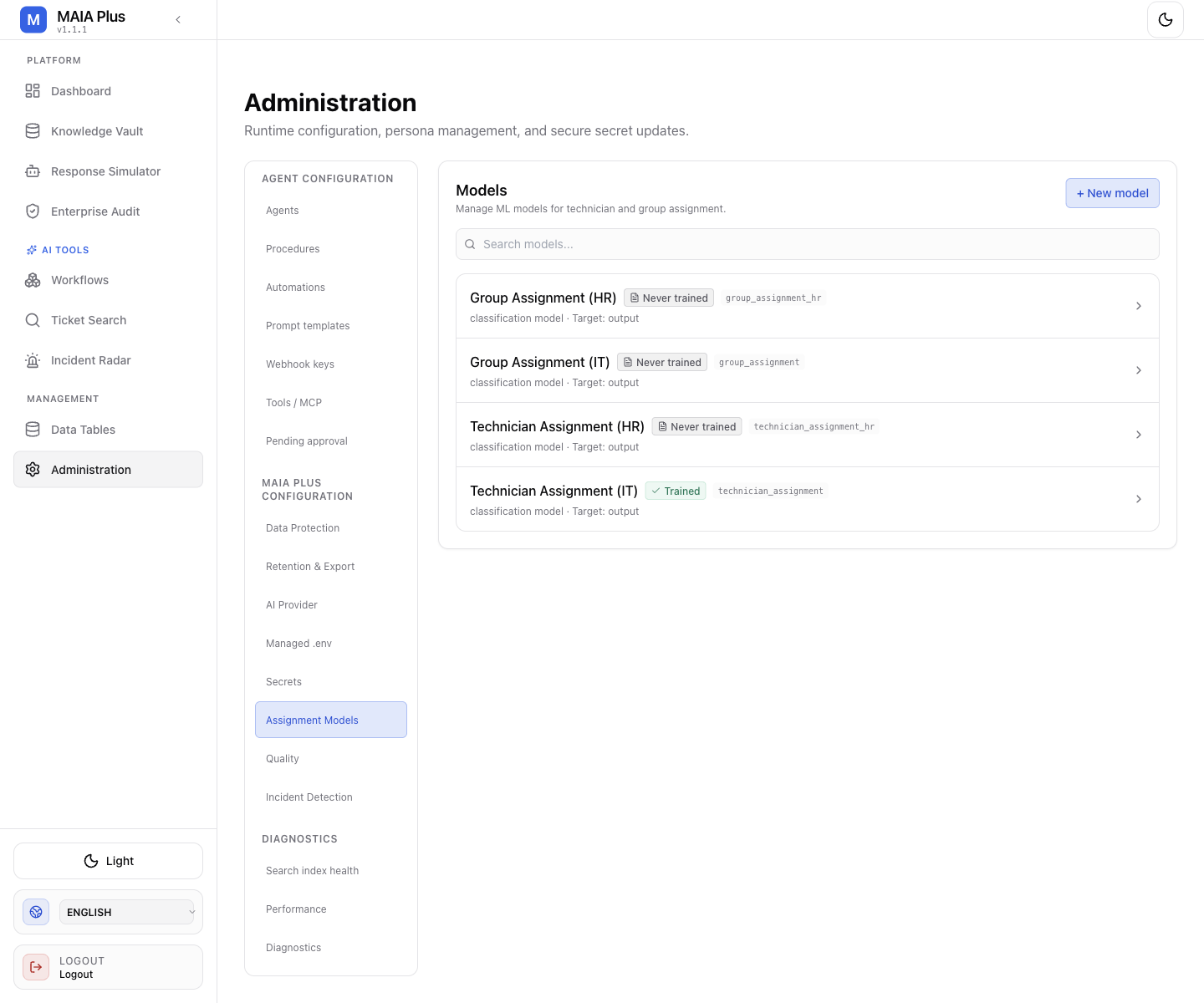
A model is Never trained until a training run produces an artifact; only a trained model can predict. Names and keys are installation-specific.
What it is
Section titled “What it is”| Term | Meaning |
|---|---|
| Model | A named configuration: model key, type, target column, the query that produces training rows, and the prediction threshold. |
| Model type | classification chooses one label from a set (technician, group). regression predicts a numeric value. |
| Target column | The column in the training query that holds the answer — typically output, the technician or group that actually resolved the ticket. |
| Prediction threshold | The minimum confidence for a prediction to be acted on. Below it the flow does not assign. |
| Artifact | The trained model file plus preprocessing artifacts, versioned per run. |
| Shadow model | A newly trained version that produces predictions without being allowed to act, until promoted. |
Assignment models are unrelated to AI Provider routes. They do not call an LLM and they do not consume tokens. They read historical tickets from ServiceDesk Plus, learn the mapping from ticket text and fields to the resolving owner, and answer with a probability per candidate.
How it works
Section titled “How it works”- Training config defines the query and the feature preparation. The query returns historical rows; the target column is what the model learns to reproduce.
- Training runs a Python job. It validates the data first (total rows, unique classes, null target rows, class distribution), then fits a model and writes an artifact.
- Minimum accuracy is a gate: a run below it is not activated.
- Prediction config defines the query used at prediction time for a single ticket, so the feature shape matches training.
- A caller invokes the model: an assign endpoint, a prediction tool inside a workflow, or a legacy ticket flow.
- The model returns
predicted_label, per-class probabilities, a confidence value, and provenance (model version, artifact id, activation time). - If the best confidence is below threshold, no assignment happens. The product writes a human-in-the-loop note naming the shortlist instead of guessing.
Configure a model
Section titled “Configure a model”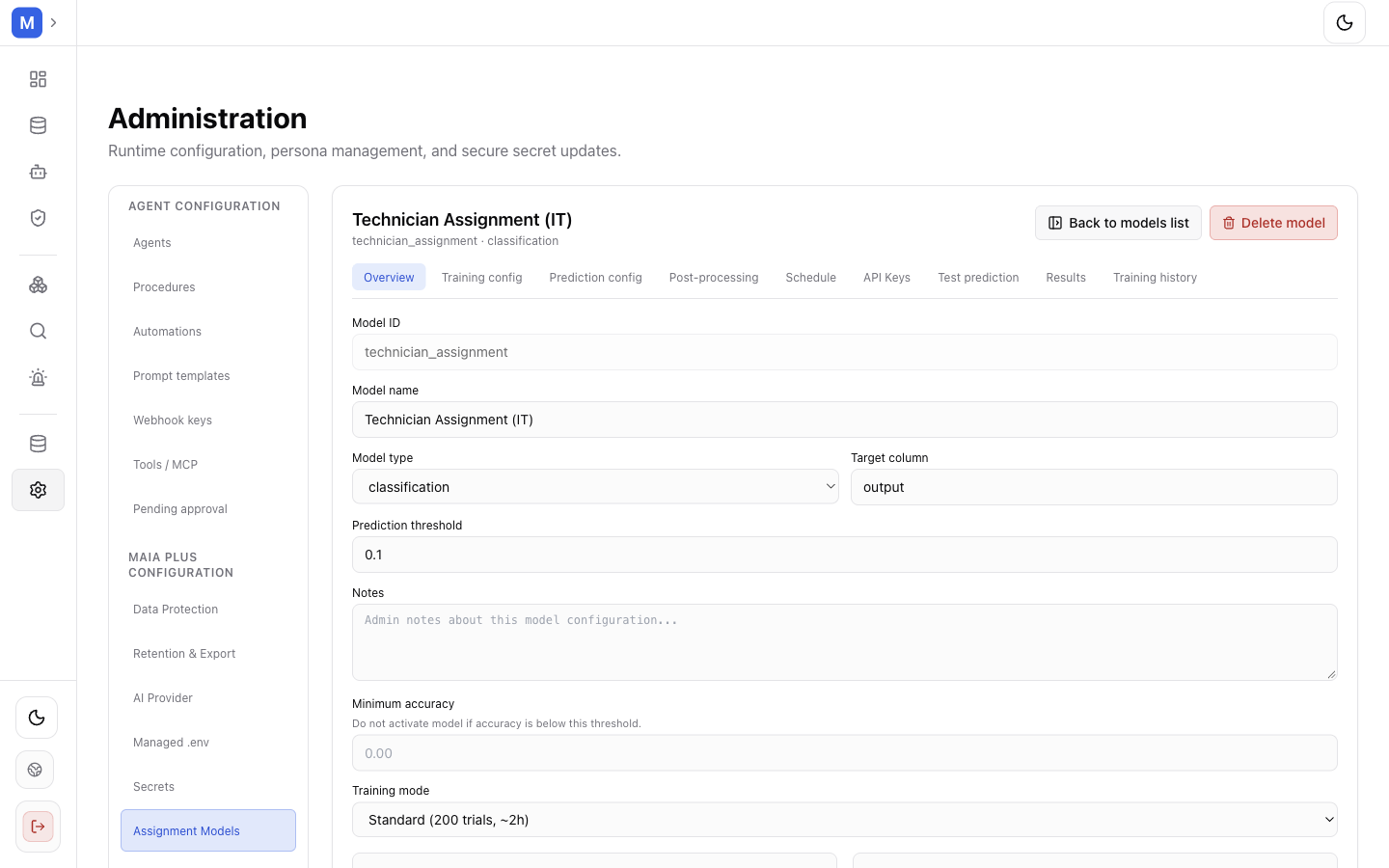
The Overview tab holds identity and gates; the remaining tabs hold data, behaviour and schedule.
- Open Administration → Assignment Models, then + New model (or select a row).
- Model ID — stable key used by the API and by workflows. It cannot be changed after creation.
- Model name — display label.
- Model type —
classificationfor technician/group routing. - Target column — the column that carries the answer in the training query (
outputin the shipped models). - Prediction threshold — start low while validating (the captured model uses
0.1) and raise it once accuracy is known. Anything below the threshold produces a recommendation, never an assignment. - Minimum accuracy — a run that scores below this is not activated. Leave empty to accept any accuracy, which is only sensible while experimenting.
- Training mode —
Fast,Standard (200 trials, ~2h),Deep (500 trials, ~8h). The cost is wall-clock time on the host, not money.
Training config
Section titled “Training config”The Training config tab carries the historical query, the feature preparation pipeline, and the validation summary: Total rows, Unique classes, Null values in target, and Class distribution. Read validation before training:
- A single dominant class produces a model that always guesses that class.
- Null target rows teach nothing; fix the query instead of training around them.
- Few rows per class make confidence meaningless — keep the threshold low and stay in shadow mode.
Prediction config
Section titled “Prediction config”The prediction config holds the query used for one ticket at prediction time and the threshold the caller will apply. It must return the same columns the features expect; a mismatch surfaces as a failed prediction, not as a wrong answer.
Post-processing
Section titled “Post-processing”Exclusion and Replacement Rules change output without retraining: exclude a technician or class (the model automatically picks the next-best candidate), or map one label to another. This is the fast fix when a person leaves the team or a group is renamed.
Schedule
Section titled “Schedule”- Cron schedule — when to retrain automatically (for example
0 2 * * *). - Min. new rows for retraining — skip the run when too little new history exists.
- SDP Portal ID — scope training to one portal.
- Current requests query and Average lead time query — enable workload balancing, so an overloaded technician is not preferred purely on historical accuracy.
API keys
Section titled “API keys”Each model can issue keys for its own predict and train endpoints. The key is shown once at generation; store it immediately.
Train, shadow, promote
Section titled “Train, shadow, promote”- Open Training history and start a run, or let the schedule start one.
- Watch the run to completion (minutes for
Fast, hours forStandard/Deep). - Read Results: accuracy and per-class metrics. A model below Minimum accuracy is not activated.
- Deploy as shadow — the new version predicts, nothing acts on it. Compare its choices with what actually happened.
- Promote the shadow model when its choices look right; promotion makes it the active artifact.
- Test prediction with a JSON payload (for example
{"category": "Network", "description": "VPN connection issue", "priority": "High"}) and read Predicted label and Confidence.
Incremental training adds new data to the existing artifact; full retraining starts over. Prefer incremental for freshness and full retraining after a taxonomy change.
Where predictions are used
Section titled “Where predictions are used”| Consumer | What it does with the prediction |
|---|---|
| Assign technician endpoint | Assigns the predicted technician, or leaves a note when confidence is below threshold. |
| Assign group endpoint | Routes the ticket to the predicted group. |
Prediction tools (Prediction Models, Predictions nodes) | Expose models to an AI Agent or a workflow step. |
| Legacy ticket flows | Call the model during automated ticket handling. This path is being replaced by workflows. |
| Workflow | Reads the recommendation and decides what to do with it, including approval before writing. |
Because the model only recommends, a workflow can require human approval before the assignment lands in ServiceDesk Plus.
Limits and failure modes
Section titled “Limits and failure modes”- Never trained → no predictions; the row shows the state explicitly.
- Below threshold → note, no assignment. This is the intended safety behaviour, not an error.
- Data drift → accuracy degrades silently after process changes; retraining schedule and shadow comparison are the guard.
- Feature/query mismatch → prediction fails rather than returning a wrong label.
- Deleting a model revokes its API keys and cannot be undone.
- Deployment identity → provenance stores model version and artifact, so an audit trail exists for every prediction.