Agents
An agent is the executor of MAIA Plus: it decides who is answering, with what knowledge, with which tools, and how much autonomy it has. Automations, the technician and requester Copilots, the Response Simulator and the Assignment surfaces all resolve to a registered agent. Configuring one is therefore the most reused piece of setup in the product. A workflow AI Agent node is the exception: it may bind a registered agent, or carry its own instructions, model and tool bindings — see AI Agent node.
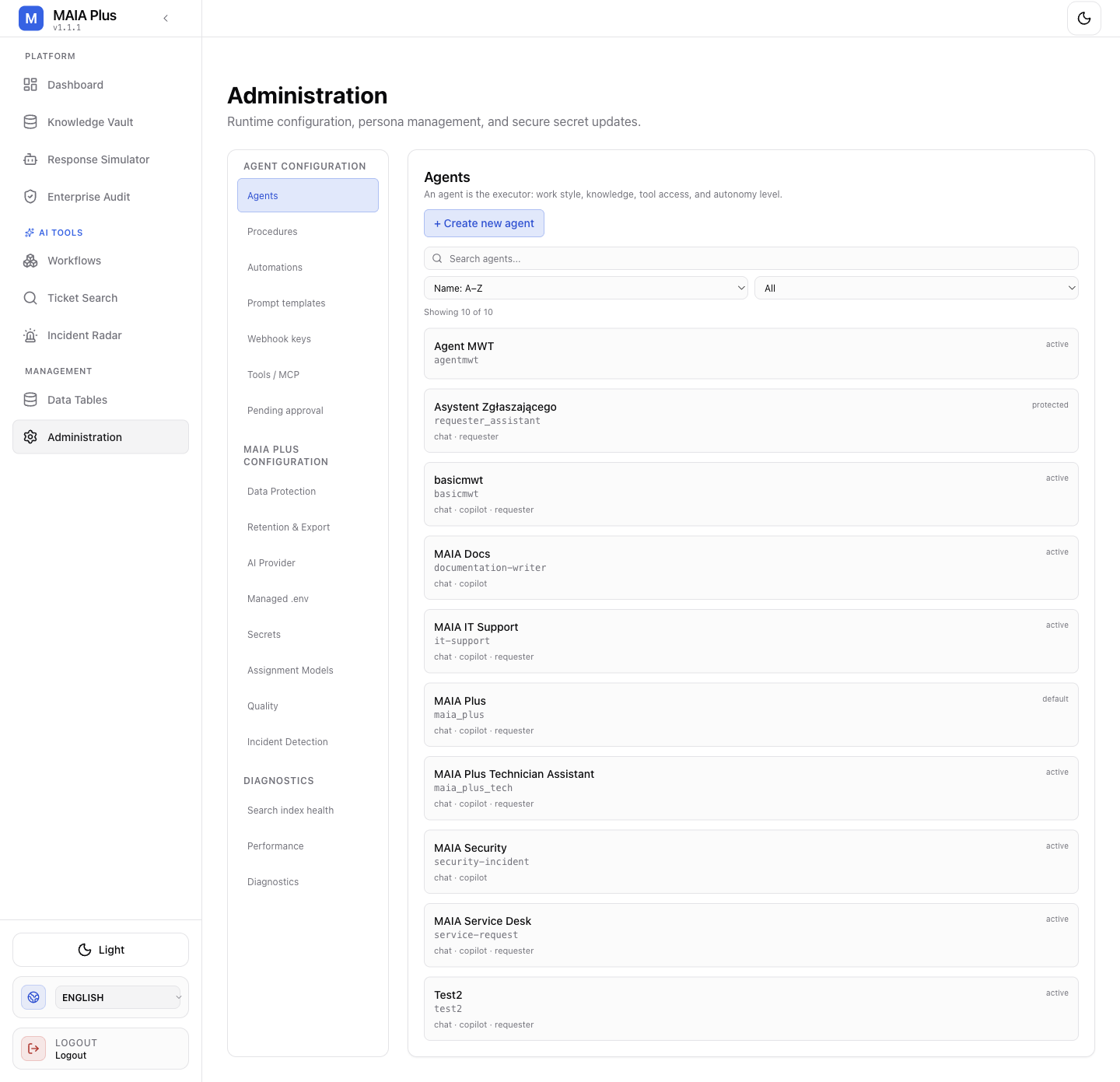
Every agent row shows its display name, key, state and the surfaces it is allowed to serve. Names and counts are installation-specific.
What an agent is
Section titled “What an agent is”An agent is a persona plus a policy, not a model. The model and its route come from AI Provider; the agent supplies the behaviour on top of it:
| Layer | What it decides | Where it is configured |
|---|---|---|
| Persona | Instructions, tone, language, description | Basic tab |
| Autonomy | Whether the agent acts alone, asks before every action, or auto-notes and asks for the rest | Basic tab, execution mode |
| Tools | Which ServiceDesk Plus operations and knowledge functions the model may call | Knowledge tab, Procedures tab |
| Retrieval | Search limits, similarity threshold, knowledge spaces | Knowledge tab |
| Memory | Whether the agent remembers earlier turns inside a conversation | Memory tab |
| Limits | Maximum reasoning/tool iterations per request | Overview tab |
Three things are easy to confuse:
- A registered agent (this page) is a reusable configuration.
- An AI Agent node inside a workflow is a step that runs a multi-turn tool loop. With an empty or
defaultagent key it is the workflow’s own AI instance — its prompts, model and tool bindings are the whole configuration. With a real key it delegates to that registered agent and inherits its persona and policy; if the key is unknown or the agent inactive, the node fails withINVALID_AGENT_KEY. - A tool is a single operation (
ticket_read,kb_search) that an agent or workflow may call. Tools are registered under Tools and MCP.
How it works
Section titled “How it works”- A surface receives a request: an automation webhook, a technician clicking in the Copilot, a simulator run, or a workflow step.
- The surface resolves the agent key.
- The agent’s instructions, tool list, knowledge scope and limits are assembled into the prompt and the tool schema.
- The model chooses between answering and calling a tool.
- Every tool call that changes data passes through approval policy, unless the agent is fully autonomous and the procedure allows it.
The Effective knowledge scope panel on the Knowledge tab is the authoritative answer to “what can this agent actually see” — it resolves portals, audiences and knowledge tags after saving.
Configure an agent
Section titled “Configure an agent”Open Administration → Agents and select a row. The editor opens with four tabs.
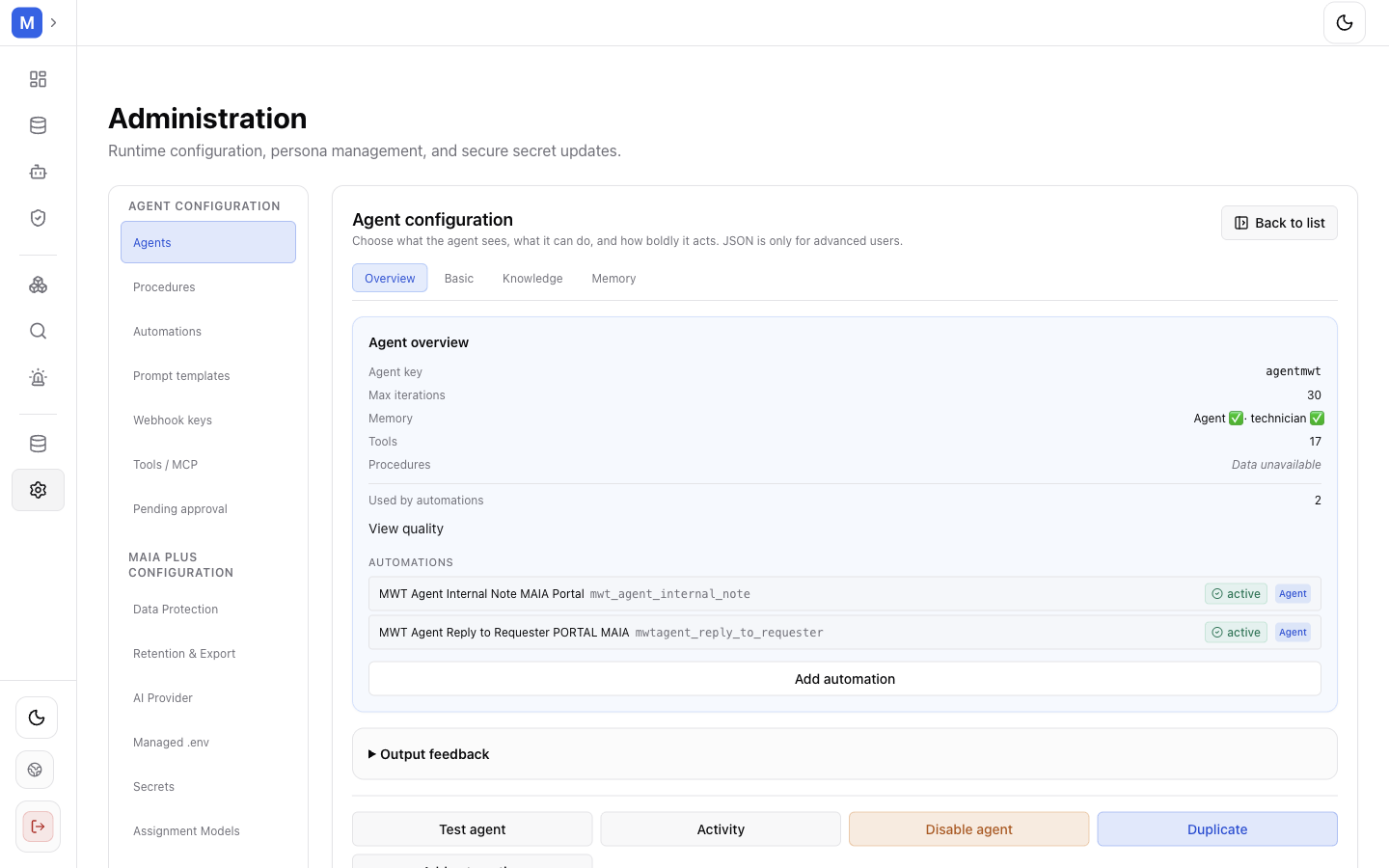
The Overview tab summarises what the agent is made of: key, limits, memory, tools and procedures.
- Overview — check the Agent key (this is what automations, workflows and Copilot bind to), the description, Max iterations, and the roll-up of tools, procedures and memory. A protected agent is read-only.
- Basic — write the persona: instructions, description, and which surfaces may use the agent (Allow in chat, Allow in technician copilot, Allow in requester copilot). Choose the execution mode. Auto runs tools without asking; Semi-auto writes notes on its own but waits for approval on every other write; Assistant asks before any write. Read a mode as scope of what runs unattended — in every mode except Auto, the approval card appears before the write, not after it. Set When to escalate — high risk, low confidence, missing information, outside scope, policy block, unsafe action, or the user asking for a human.
- Knowledge — pick the tools the model may call and the retrieval limits:
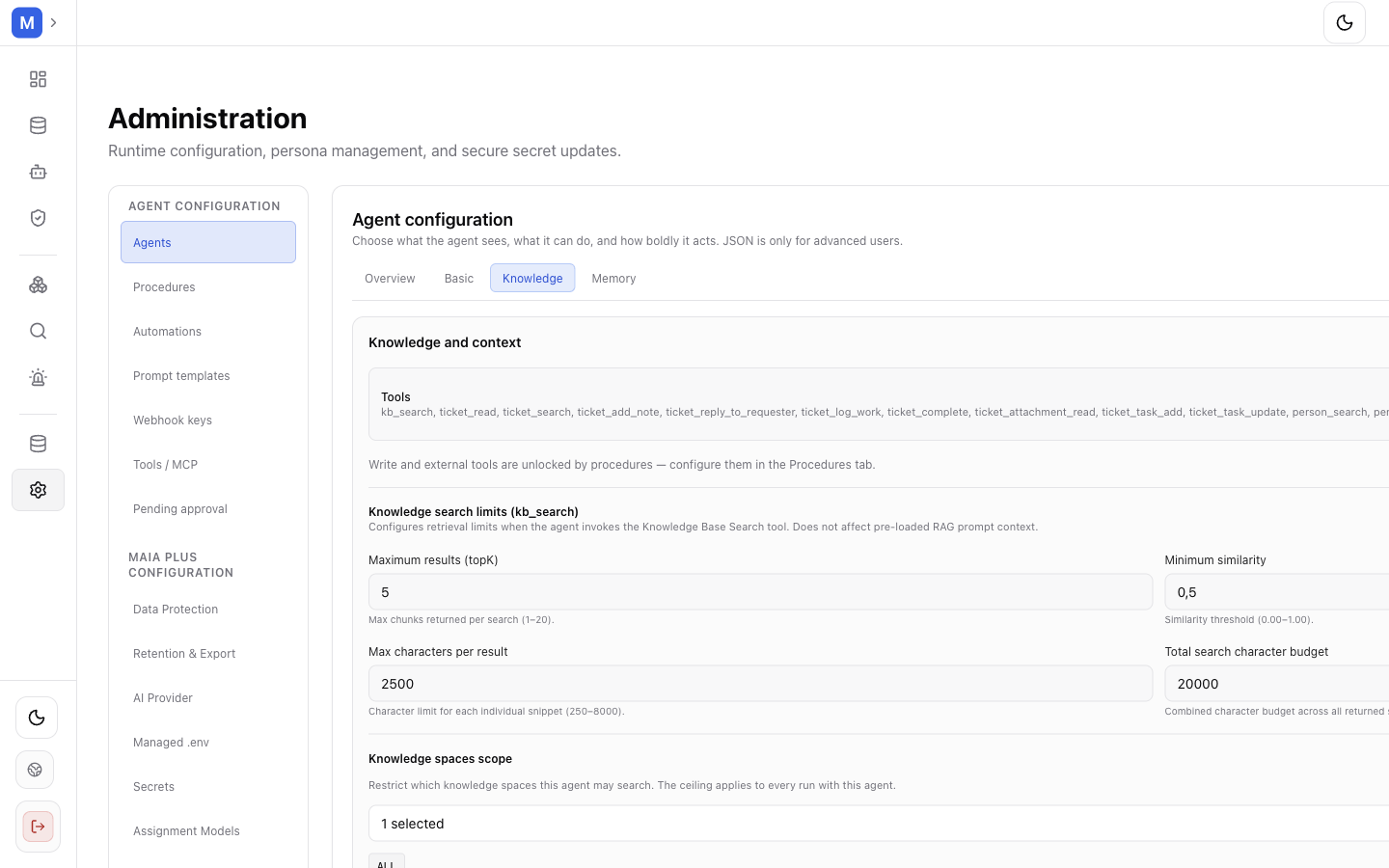
Knowledge search limits control how much context a kb_search call may return; the knowledge spaces scope caps every run with this agent.
- Tools — for example
kb_search,ticket_read,ticket_search,ticket_add_note. Write and external tools are unlocked by procedures, not by ticking a box. - Maximum results (topK) 1–20, Minimum similarity 0.00–1.00, Max characters per result 250–8000, Total search character budget.
- Knowledge spaces scope — the ceiling for every run with this agent.
- Memory — enable or disable conversation memory and choose what it retains. Memory is what makes a Copilot conversation feel continuous; disabling it makes every turn independent and cheaper.
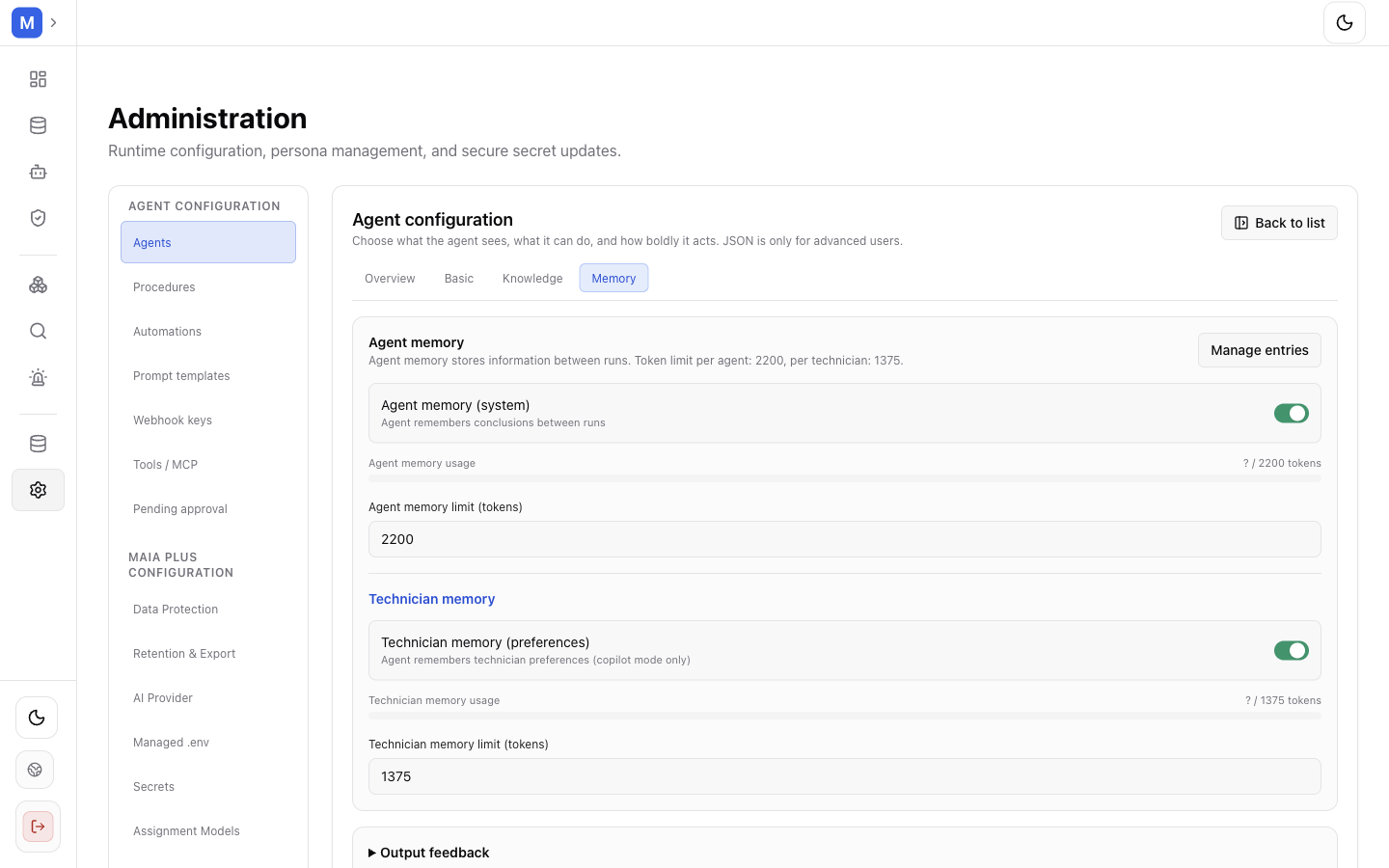
Memory settings apply per conversation; disabling memory makes each turn independent.
After saving, use Test agent to run a dry-run. A test is a real model call and can reach real tools, so treat it as an action with cost and possible side effects, not as a lint check. Activity shows recent runs, Duplicate creates a copy for experimentation, and Disable stops the agent from serving any surface.
What an agent does not decide
Section titled “What an agent does not decide”- The model and provider — that is an AI Provider route.
- The trigger — an automation binds a webhook to an agent; a workflow binds a trigger to steps.
- Which tickets exist — portal scope is resolved per run, and a portal value in a request never grants access on its own.
Two ways to own an agent’s configuration
Section titled “Two ways to own an agent’s configuration”Both exist in 1.1.1, and they are not a migration in progress — they answer different questions.
| Aspect | Registered agent | Workflow AI Agent node |
|---|---|---|
| Scope | Installation-wide, reusable across surfaces | One step in one graph |
| Where configured | Administration → Agents | The node in the workflow editor |
| Persona | systemInstruction | The node’s instructions |
| Model | Installation route, or the agent’s policy | Optional modelProfileId; empty means the installation route decides |
| Tools | Agent tool list, unlocked by procedures | Tool nodes wired to the node’s tool-binding edge |
| Reachable from | Automations, Copilots, Simulator, workflows that bind its key | Only the graph it lives in |
| Approval | Agent policy and procedure gate | The node’s Autonomous tool execution switch and the same gate |
The practical rule: bind a registered agent when the behaviour must be identical across surfaces or must be governed centrally; configure the node when the logic belongs to one graph and nothing else should reuse it.
Every automation can additionally point at a workflow_key instead of an agent, which is the direction of travel: workflow graphs are the surface that will eventually absorb automation configuration. Nothing in 1.1.1 is waiting for that — both mechanisms are supported and documented.
Related topics
Section titled “Related topics”AI Provider · Tools and MCP · Procedures · Automations · Response Simulator