Automations
An automation is a webhook endpoint with a brain attached: ServiceDesk Plus (or any caller holding the key) posts a ticket event to the endpoint, and MAIA Plus runs an agent — or an older flow — against that event. Everything else in the product is either a building block of an automation or a way to observe one.
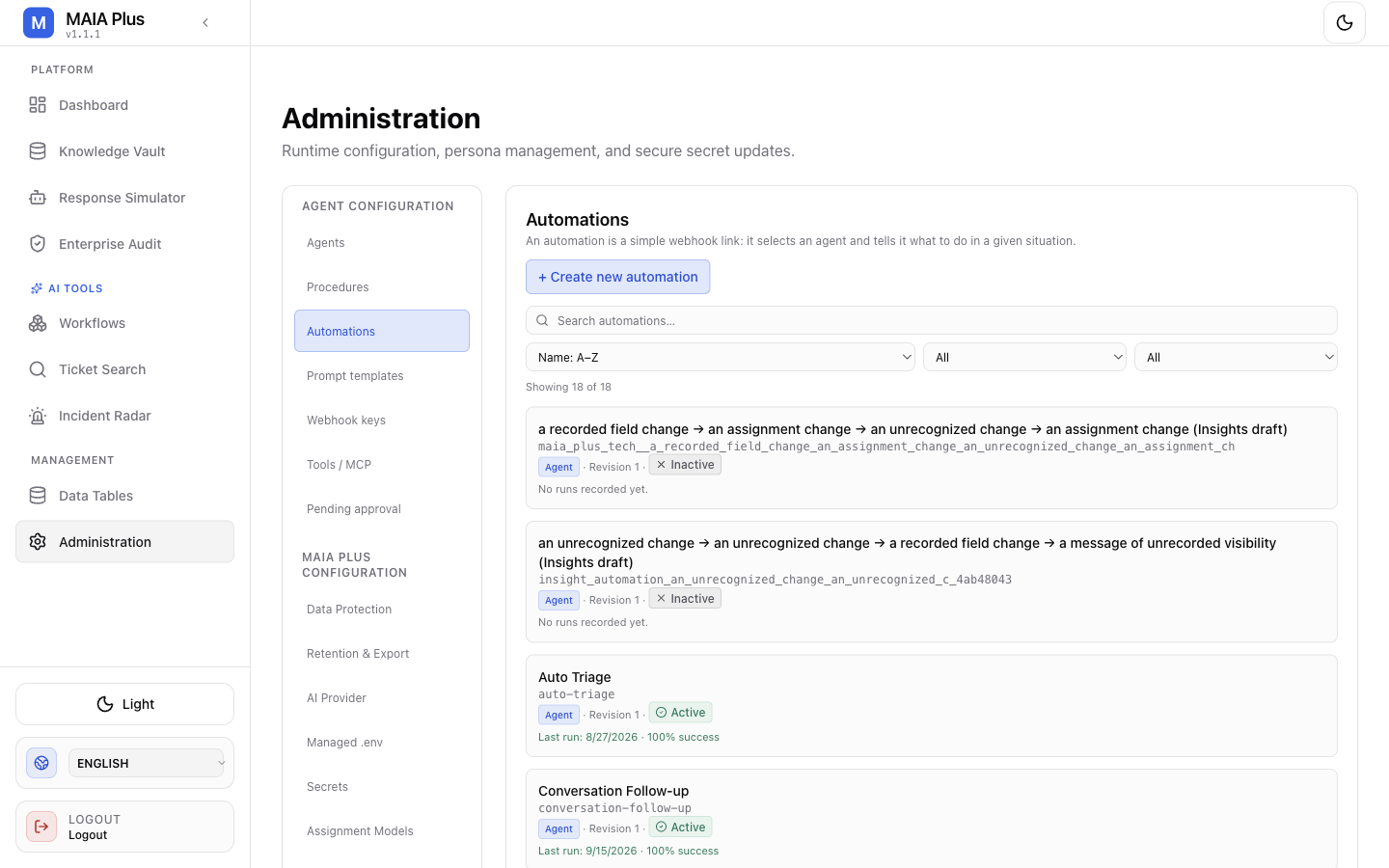
Each row is one endpoint: it names the agent it runs, the revision of its configuration, and when it last ran. Names are installation-specific.
What it is
Section titled “What it is”| Object | Meaning |
|---|---|
| Automation profile | The configuration: which agent runs, what it may do, in which language, with which approval policy. |
| Webhook key | A credential bound to one target, sent in the x-api-key header (prefix whk_). Possession of the key — not the URL — is what authorises the call. The URL only selects the target. |
| Automation type | agent (an agent answers), flow (a legacy deterministic flow), or custom_context_search (a context-only search endpoint). |
| Revision | Every save increments it, so an audit row can be tied to the configuration that produced it. |
The two paths — and where they are going
Section titled “The two paths — and where they are going”An automation can run an agent or a legacy flow. They differ in who decides:
- Agent automation — the model decides how to reach the goal, using the tools and procedures granted to it. The profile defines limits, language policy, approval policy and what the agent may change.
- Legacy flow automation — a fixed deterministic path with a category-prediction step and a note template. Predictable, cheaper, and narrower: it cannot reason about a ticket it has not seen before.
The flow path is the legacy option. Automations already carry a workflow_key field, and workflows are the supported surface for expressing both the deterministic steps and the agent step in one graph, with explicit branches, approvals and error handling. New integrations should be built as workflows; the flow path is documented here so existing installations can be understood and migrated.
Create an automation
Section titled “Create an automation”- Open Administration → Automations and select + Create new automation.
- Choose the agent that should run. The agent determines persona, tools, knowledge scope and autonomy — an automation is not where those are configured.
- Decide what the agent can do in this automation: the second section of the form states it plainly — write and external tools are unlocked by agent skills, meaning procedures. An agent with no write procedure produces notes, not changes.
- Set the behaviour that is specific to this endpoint:
- Approval policy — inherit the agent’s policy, or always require approval.
- Language policy — follow the user, the ticket, the webhook payload, a fixed language or the system default; with a fallback language.
- Citation contract — whether answers must carry citations, which audience they are shown to, and whether sources are appended as a fallback.
- Estimated time saved per successful execution — the minutes credited to the Dashboard. It is an estimate captured at admission, not measured labour time.
- Save, then Copy webhook to obtain the endpoint URL for ServiceDesk Plus.
A new automation stays inactive until you enable it. Enabling is the moment it can start changing tickets.
Category prediction (the legacy flow path)
Section titled “Category prediction (the legacy flow path)”The flow path configures a prediction source: an assignment/classification model from Assignment models, the LLM, or a hybrid.
- Model not trained → the hybrid mode silently falls back to the LLM; a model only mode blocks the update and records
ml_only_no_predictionin the audit. - Confidence threshold — below it, no category is set.
- Note template — what is written back to the ticket, with
{{label}},{{category}},{{subcategory}},{{confidence}}and{{source}}available. - Set category / subcategory on the request — the only two writes this path performs.
Wire it into ServiceDesk Plus
Section titled “Wire it into ServiceDesk Plus”The automation endpoint does nothing until ServiceDesk Plus calls it. That is a two-part configuration on the SDP side: a custom trigger that fires on an event, and a webhook action that posts the event to the MAIA Plus URL with the required headers. The full walkthrough — including which fields the payload must carry and where the key is placed — is in Custom triggers.
Two rules that prevent most integration failures:
- The webhook must send MAIA authentication headers in addition to the endpoint key.
- The payload must identify the ticket and the portal; a portal value in a payload never grants access on its own.
Test and observe
Section titled “Test and observe”- Test automation runs the configured agent against a supplied input. It is a real model call and can reach real tools.
- Activity lists the runs of that endpoint with status and duration.
- Duplicate copies the profile for a safe variation.
- Disable stops the endpoint from accepting new runs.
Every run is visible in Enterprise Audit under Runs, with the automation profile, the agent, the business result and the tool calls that took place.
Limits and failure modes
Section titled “Limits and failure modes”- Inactive automation → the endpoint rejects the call; nothing is logged as a run.
- Missing authentication headers → rejected before the agent starts.
- Write tool not unlocked by a procedure → the agent produces a note instead of the change you expected.
- Approval required → the run pauses and appears in Pending approval; it does not silently proceed.
- Model not trained, model-only prediction → the update is blocked and audited.
- Revision drift → after a save, runs use the new revision; compare the revision in the audit row before blaming the agent.
Related topics
Section titled “Related topics”Agents · Procedures · Custom triggers · Enterprise Audit · Workflow designer