Knowledge Sources
A source is a rule that says “keep this outside content in the vault”. Manual upload is perfect for a handful of documents; a source keeps a whole library in sync without anyone clicking. MAIA Plus supports two source families: SQL sources that read from the ServiceDesk Plus database, and file sources that read a folder from disk.
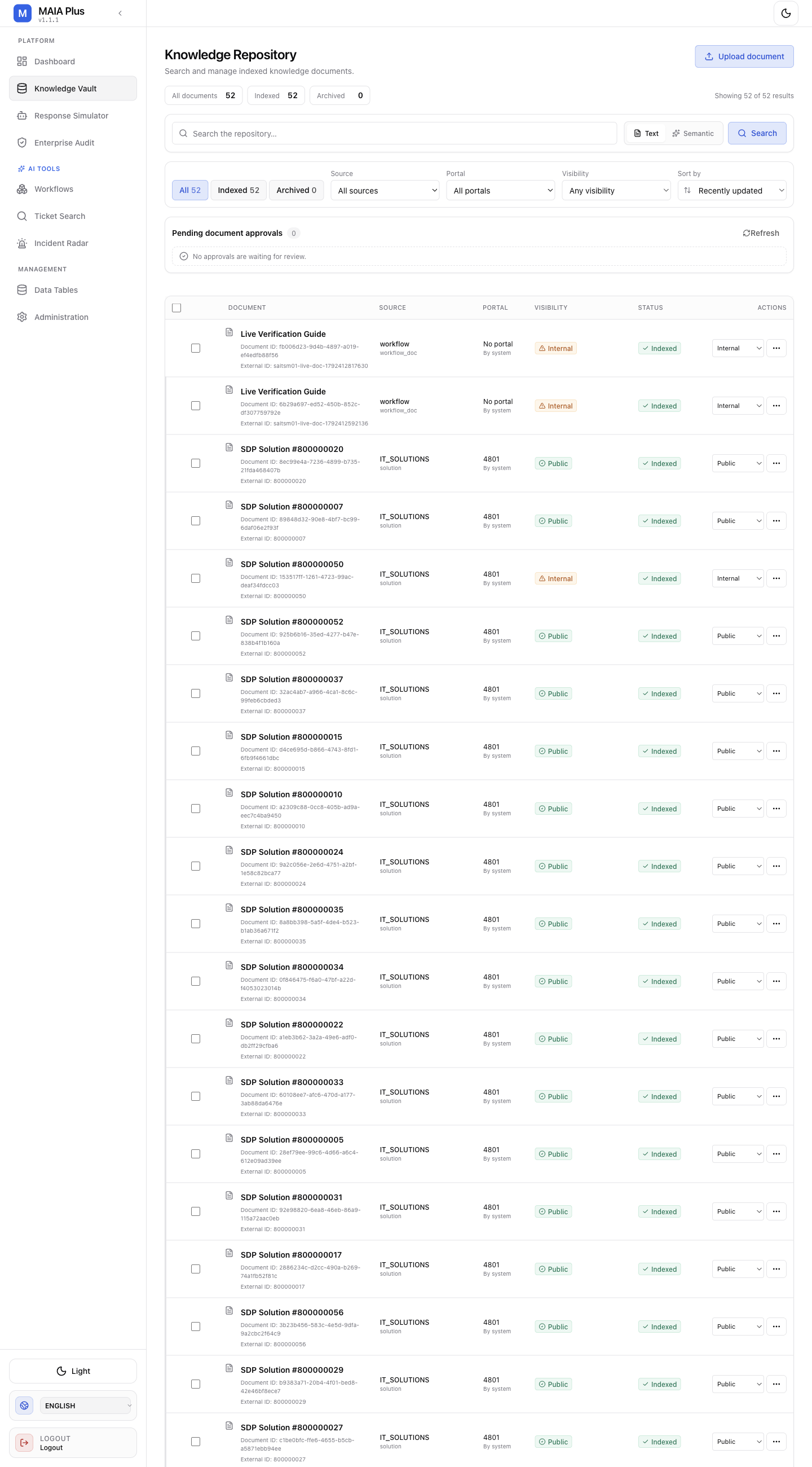
Every document carries the tag of the source that produced it, which is what the Source filter shows.
What it is
Section titled “What it is”| Field | Meaning |
|---|---|
| tag | The source name that appears in the vault’s Source filter and on every document. |
| type | sdpDB (SQL over the ServiceDesk Plus database) or file (a folder on the MAIA Plus host). |
| access | Visibility ceiling: auto, internal or public. auto keeps provider-native visibility and falls back to internal when the provider has none — file sources have none, so they default to internal. |
| portal_id | Optional ServiceDesk Plus portal scope. |
| target_languages | Languages to embed for; multilingual corpora can be embedded per language. |
| force_reembedding | Re-embed existing documents instead of skipping unchanged rows. |
SQL sources
Section titled “SQL sources”A SQL source is three queries and a cutoff:
| Field | Purpose |
|---|---|
fetch_query | Rows to ingest: the id, the title, the text and the last-updated timestamp. |
update_check_query | Rows that changed since the last sync. Without it, every run re-reads everything. |
deletion_check_query | Rows that disappeared upstream, so their documents can be removed from the vault. |
cutoff_timestamp | Ignore history older than this instant. |
A minimal setup reads approved ServiceDesk Plus solutions:
{ "tag": "IT_SOLUTIONS", "type": "sdpDB", "fetch_query": "SELECT s.solutionid, s.title, s.description, si.lastupdatedtime FROM solution s LEFT JOIN solutioninfo si ON s.solutionid = si.solutionid WHERE s.statusid = 1", "update_check_query": "… AND (si.lastupdatedtime/1) >= :lastSync", "portal_id": 1}The query must be a read-only SELECT. MAIA Plus validates the projection and refuses anything that is not a bounded read.
File sources: documents from disk
Section titled “File sources: documents from disk”A file source points at a folder on the host:
{ "tag": "RUNBOOKS", "type": "file", "local_path": "/srv/maia/knowledge/runbooks", "file_extensions": [".md", ".pdf", ".txt"], "access": "internal"}Behaviour worth knowing before you create one:
- The folder is read by the service account, so it must be readable by that account — a permission problem surfaces as an empty sync, not as an error dialog.
file_extensionsis an allow-list. Files with other extensions are ignored.- File sources have no native visibility, so
accessdefaults tointernal. - Removing a file from the folder removes its document on the next sync only if a deletion check is configured for that source family; otherwise delete the document in the vault.
- A file source does not copy files. The originals stay where they are and are re-read on change.
Register a source
Section titled “Register a source”Sources are configuration, not a form in the WebUI: they live in the KB_SOURCES_CONFIG setting (managed through Managed .env as a JSON array) and are read by the knowledge sync job.
- Open Administration → Managed .env and find
KB_SOURCES_CONFIG. - Add the source object. Keep the
tagshort and stable — it becomes the document’s provenance and cannot be renamed later without re-ingesting. - Save. The setting is parsed as JSON; malformed JSON is rejected on save.
- Trigger a sync, or wait for the scheduled run.
- Verify in Knowledge Vault: filter by Source and check that documents appear with status
Indexed.
A source that produces no documents is almost always one of: wrong path, unreadable by the service account, extension not in the allow-list, or an embedding route that is not configured.
How a sync behaves
Section titled “How a sync behaves”- The job reads the source definition.
- Changed rows or files are fetched, unchanged ones are skipped unless
force_reembeddingis set. - Text is extracted, chunked and embedded.
- Documents are upserted and stamped with the source tag.
- Deletions upstream are applied when a deletion check exists.
An interrupted sync is safe to re-run: documents are keyed by source and external id, so a second run updates rather than duplicates.
Limits and failure modes
Section titled “Limits and failure modes”- Unstable tags → duplicated provenance; keep the tag stable.
- Broad
fetch_query→ the whole knowledge base is embedded, costing embedding tokens and time. - No
update_check_query→ every run reprocesses everything. - File source with no deletion check → removed files leave orphan documents that must be deleted manually.
- Access escalation →
access: publicon a source that contains internal runbooks publishes them to requester-facing retrieval.
Related topics
Section titled “Related topics”Knowledge Vault · Indexing and search · Managed environment · AI providers