Overview
MAIA Plus meets the technician inside ServiceDesk Plus: a Copilot beside the ticket, a summary action, rewrite suggestions, knowledge search and proactive hints. Nothing needs a second login — the page script exchanges the live SDP session for a MAIA token in the background.
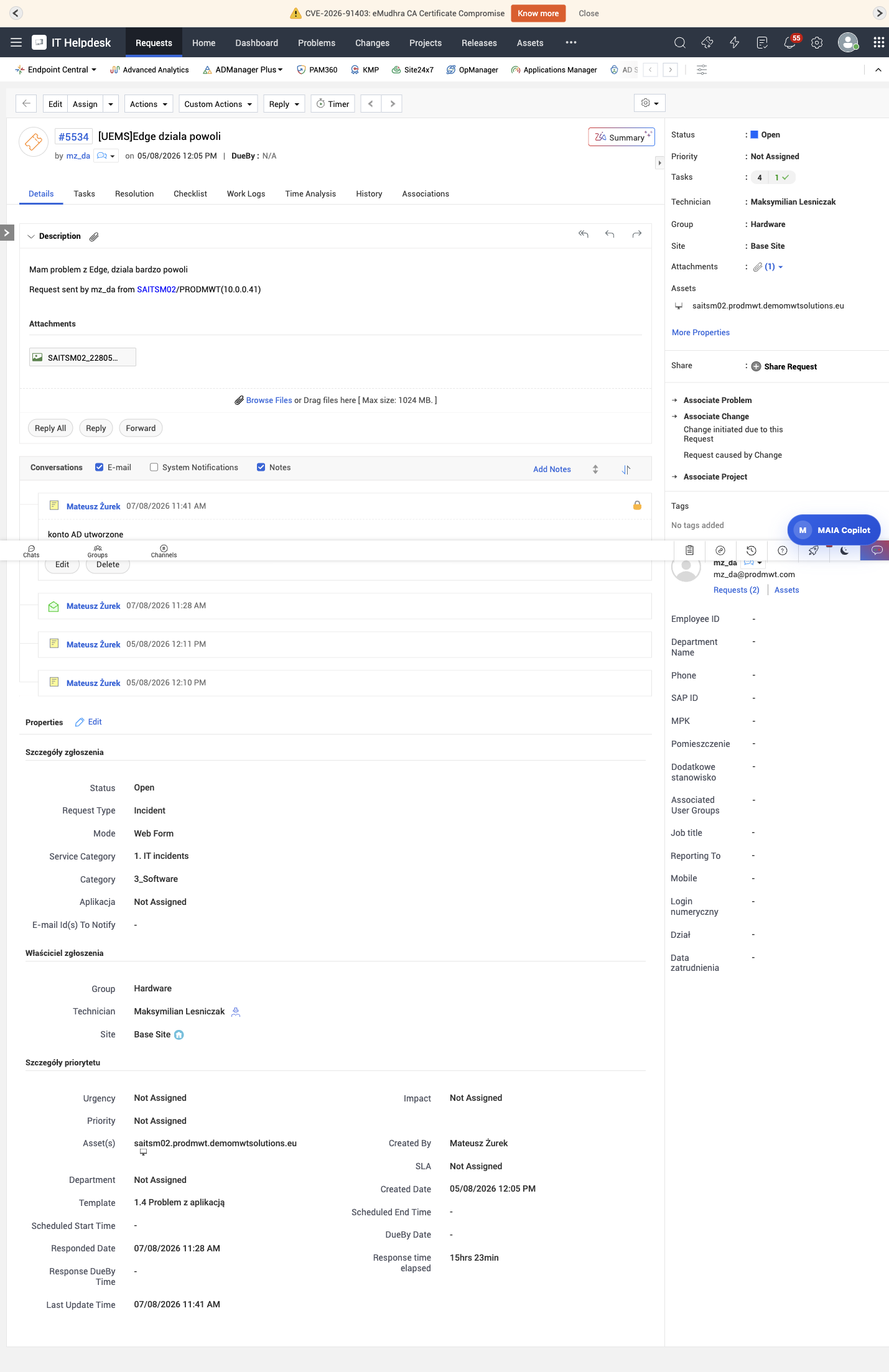
Two entry points on every request: the action in the header, and the always-visible Copilot launcher.
What is available
Section titled “What is available”| Feature | Where it appears | What it needs |
|---|---|---|
| Technician Copilot | Launcher at the bottom right of SDP pages | A verified technician session and a bound agent |
| Summary | Header action on a request | The summary flow target and a provider route |
| Rewrite | Inside the reply editor | The rewrite flow target |
| Knowledge search | Ticket page | Knowledge documents in scope |
| Proactive hints | Request details | Ticket index and the hints agent |
| Spotlight | Global overlay | Ticket index |
Everything is delivered by page scripts, so availability is decided by Developer Space → Page Scripts: a rule that is disabled, or attached to a different page type, removes the feature for every technician.
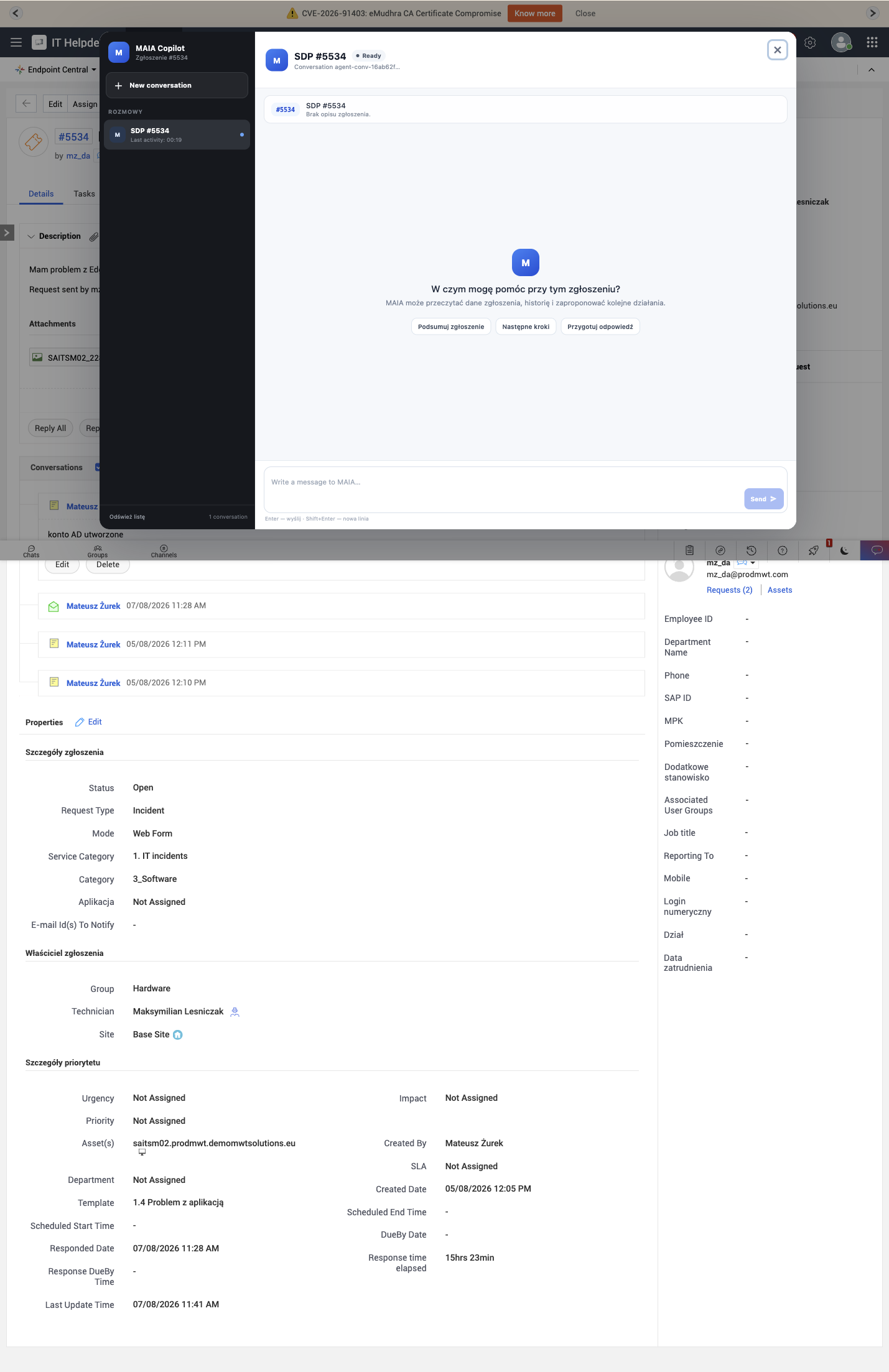
The panel keeps the ticket in context: conversations on the left, the ticket summary and suggested prompts in the middle, the message box at the bottom.
Capture note. The panel chrome in this image was translated from the shipped script for readability: the labels are hardcoded Polish in this build (see the limitation below). The greeting, suggested prompts and the message text are produced under the agent’s language policy, so they follow the ticket or the user’s language — not the interface language. Use the mapping below when you look for the controls on your own screen.
How a technician uses it
Section titled “How a technician uses it”- Open a request in ServiceDesk Plus. The header shows Summary; the launcher shows MAIA Copilot.
- Use Summary for a fast orientation — it reads the ticket and returns the essence, without touching the record.
- Open the Copilot when the question needs a conversation: what changed, what to try, what similar tickets did.
- Inside the conversation, a write action may appear as an approval card. Whether one appears depends on the agent’s autonomy mode and on the tool’s policy: in Assistant every write waits, in Semi-auto notes go through but other writes wait, in Auto nothing waits. The card is always before the effect; the audit row is always after it.
- Every run lands in Enterprise Audit with the ticket, the agent and the tool calls, so a technician can be asked “why did MAIA note that?” and the answer exists.
Session handling
Section titled “Session handling”The bootstrap authenticates silently with the SDP session. Consequences a technician actually notices:
- No separate password, and no login prompt — if the SDP session is gone, the feature simply does not appear.
- The MAIA token lasts 8 hours. Signing out of ServiceDesk Plus does not revoke it; it expires, or it is revoked when the session ends on the MAIA side.
- Portal scope is taken from the SDP session, so the Copilot sees the portal the technician is working in, not another one.
Match the labels on your screen
Section titled “Match the labels on your screen”| In this documentation | On a real technician screen |
|---|---|
| New conversation | Nowa rozmowa |
| Send | Wyślij |
| Ticket assistant | Asystent zgłoszenia |
| Suggested prompts | Polish prompt chips generated from the ticket |
Everything else — the ticket context strip, the message text, the citations — follows the language policy, so it can be English while the chrome is not.
Known limitation: panel language
Section titled “Known limitation: panel language”In version 1.1.1 the technician panel displays its interface labels in Polish (Nowa rozmowa, Wyślij, Asystent zgłoszenia) whatever the ServiceDesk Plus account language is. The surrounding SDP interface can be English while the panel is not. This is a known limitation of the current panel build rather than a configuration problem; answers themselves follow the agent’s language policy. The mapping table above shows which Polish label corresponds to each control described in this guide.
Limits
Section titled “Limits”- Visible launcher ≠ enabled agent — the launcher renders when the script runs; the agent must exist and be granted to the technician surface.
- Write actions follow the agent’s mode and the tool policy. An approval pauses the run until someone decides; nothing partial is written.
- Scope — the Copilot answers within the technician’s portal scope, and a request for another portal fails rather than leaking.
- Index freshness — hints and search depend on the ticket index; a stale index produces weak suggestions.
Related topics
Section titled “Related topics”Access from ServiceDesk Plus · AI actions · Reviewing results · Page scripts