Node reference
A workflow is a graph of nodes connected by edges. Everything MAIA Plus can do inside a workflow is a node type: start a run, read a ticket, call a model, branch, loop, write a row. There are 26 registered types, and this page is the map.
How to read the node pages
Section titled “How to read the node pages”Every node page follows the same structure: purpose, screenshot of the panel, configuration fields, input and output handles, expression support, errors and effects, and a worked configuration example.
| Element | What it means |
|---|---|
| Configuration table | Field name, type, default and effect, taken from the schema this version ships |
| Example configuration | A schema-valid configuration object. The field names and types are correct for this version; the identifiers are placeholders and must be replaced with your own |
| Expected result | The behaviour the node produces when it runs with that configuration — not a recorded run from a particular installation |
Two conventions are worth knowing before you rely on an example:
- Examples are not recordings. They are validated against the schema, so they will not be rejected for an unknown field, but the values must match your installation — a table id, a tool key or a model profile that does not exist in your environment fails at run time.
- Expected results describe behaviour, not data. The shape of a result is stable; its content depends on the ticket, the knowledge base and the model that produced it.
What a node is
Section titled “What a node is”| Part | Meaning |
|---|---|
| Type | The registered kind (trigger_webhook, action_sdp, logic_if, ai_agent, …). Determines behaviour and configuration. |
| Label | The name you see on the canvas. Free text; does not affect execution. |
| Configuration | Type-specific fields, edited in the node panel. |
| Inputs and outputs | Named handles. Some nodes have one output, branch nodes have several. |
| Effect class | Read, write, or control flow. A write node changes another system. |
The logic_loop_boundary type is internal: schema-v3 loops need it, but it is not something you add from the palette.
Read a node card
Section titled “Read a node card”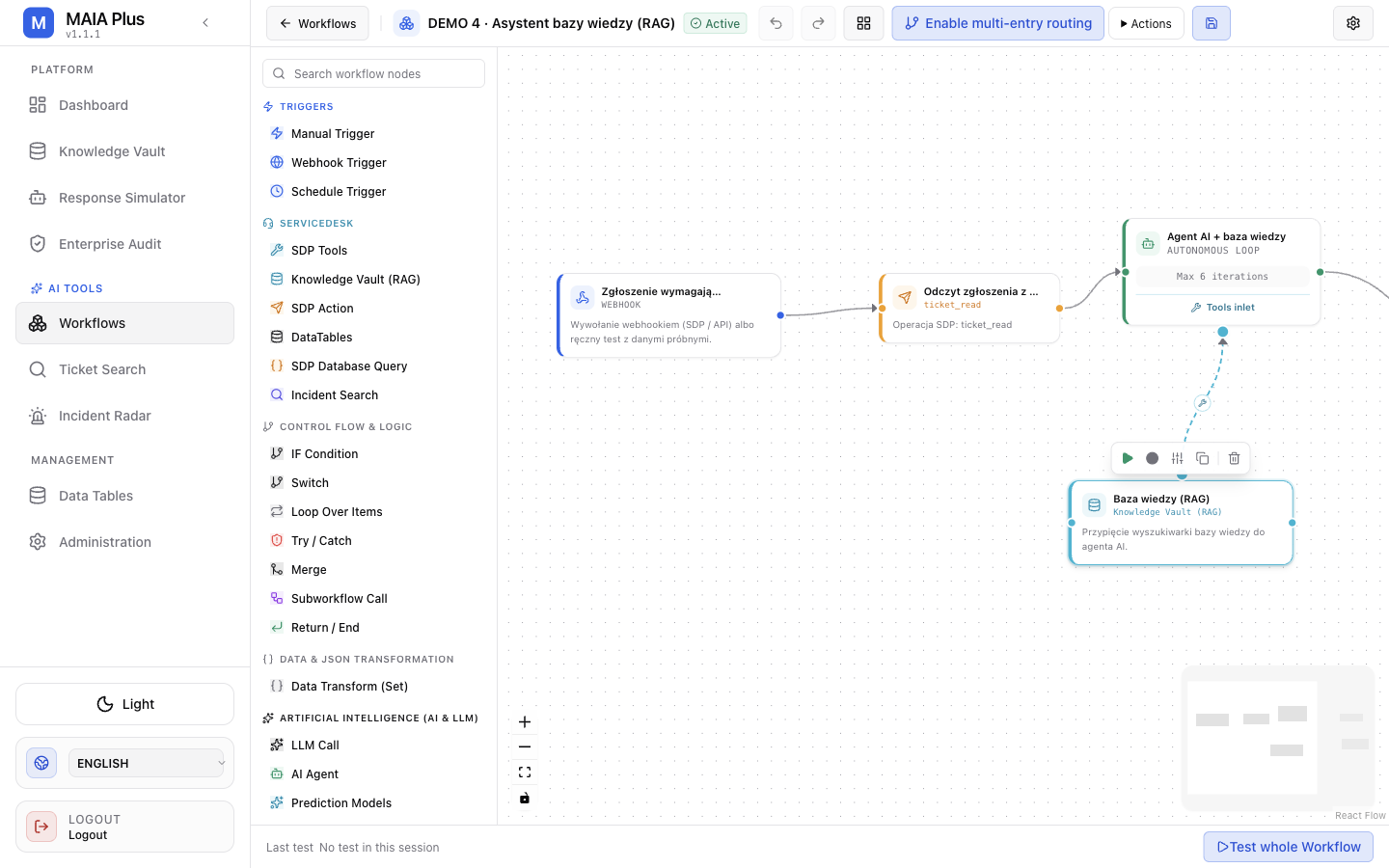
Every card shows the same three things:
- Title — the label you gave it.
- Type badge —
WEBHOOK,ticket_read,SINGLE COMPLETION,KNOWLEDGE VAULT (RAG),AUTONOMOUS LOOP,TRUE / FALSE,FINAL OUTPUT. The badge is the contract; the title is decoration. - One-line purpose — the description written by the author of that node.
Selecting a node opens its toolbar: Run to this node, Add Breakpoint, Configure parameters, Duplicate this node, Delete node.
Palette groups
Section titled “Palette groups”| Group | Node types |
|---|---|
| Triggers | Manual Trigger, Webhook Trigger, Schedule Trigger |
| ServiceDesk | SDP Tools, Knowledge Vault (RAG), SDP Action, DataTables, SDP Database Query, Incident Search |
| Control flow and logic | IF Condition, Switch, Loop Over Items, Try / Catch, Merge, Subworkflow Call, Return / End |
| Data and JSON transformation | Data Transform (Set) |
| AI and LLM | LLM Call, AI Agent, Prediction Models, Predictions, Knowledge (RAG) |
| Advanced integrations | JavaScript Code, MCP Tools, HTTP Request |
Provider nodes versus action nodes
Section titled “Provider nodes versus action nodes”The most common source of confusion, and the reason two nodes can look identical in the palette:
- Provider nodes hand capability to an AI Agent without executing anything:
SDP Tools,Knowledge Vault (RAG),Prediction Models,MCP Tools. They connect to an agent’s tools inlet, not to the main flow. - Action nodes execute immediately:
SDP Action,DataTables,SDP Database Query,Incident Search,Knowledge (RAG),Predictions. They sit on the main flow and take an edge.
An agent with no provider node has no tools. An action node with no incoming edge never runs.
Node pages
Section titled “Node pages”Each type has its own page with the configuration panel, parameters and failure behaviour.
By category
Section titled “By category”- Triggers — Manual, Webhook, Schedule
- ServiceDesk — SDP Tools, Knowledge Vault (RAG), SDP Action, DataTables, SDP Database Query, Incident Search
- Logic — IF Condition, Switch, Loop Over Items, Try / Catch, Merge, Subworkflow Call, Return / End
- Data — Data Transform (Set)
- AI — LLM Call, AI Agent, Prediction Models, Predictions, Knowledge (RAG)
- Integrations — JavaScript Code, MCP Tools, HTTP Request
Limits and failure modes
Section titled “Limits and failure modes”- Wrong handle connected → a branch node activates an output with no downstream connection; the run ends early and reports success.
- Provider node on the main flow → it never feeds the agent and the agent has no tools.
- Renamed label → nothing breaks; do not debug by label.
- Unknown type in an imported graph → the node renders as unknown and the graph cannot be activated.
- Loop without a bound → use
maxIterations; an unbounded loop is a runtime hazard, not a feature.
Related topics
Section titled “Related topics”Workflow designer · Expressions and context · AI agent nodes · Testing and debugging